 Rick Martin · · 2 min read
Publishing Tools to Share: TextMate Snippets for Stock Tickers and Live Blogging
We like to experiment with new publishing tools here at PO. And like many of the start-ups we cover, our team has to try to figure out the best way to work efficiently on a limited budget. We use an assortment of free/low-cost tools to add graphs, maps, videos, weird anchor links — basically anything that we think might add value for readers.
Most recently we started adding stock/ticker symbols in our article text and meta data in an effort to
- provide and value to readers who want that information, and
- hopefully increase our reach via Google Finance news.
In the beginning, we found ourselves having to constantly check what the symbols for certain companies were (i.e. NASDAQ:AAPL for Apple, NASDAQ:BIDU for Baidu, etc). But since many of us here do our WordPress blogging in TextMate, we figured that a collection of TextMate snippets (read ‘keyboard shortcuts’) would do the trick.
Tech Tickers
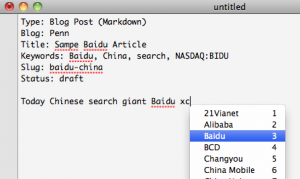
Click to enlarge
So now we have just that: a collection of Asia-focused tech company tickers that can be summoned with a quick keystroke or two.
We’d like to share this with other Asia-focused news sites in the community (yes, even with our competitors) because we’re all essentially working towards the same goal here. And given the amount of tech-savvy people who read this blog, perhaps someone out there has an idea of how we might improve upon it. You can download the bundle here.
And for live blogging…
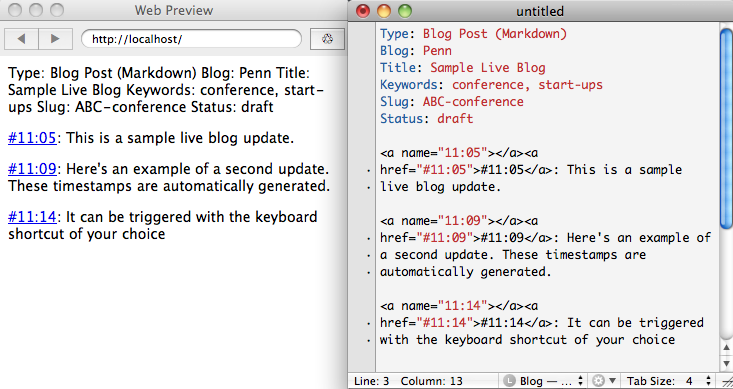
We also have a simple live blogging tool that lets you add anchor-tagged time stamps to your updates (see example from our Global Mobile Internet conference live-blog). You can download that snippet here. It’s just few lines of code, and probably has no business being on Github. But it’s really useful – and improved since last time we mentioned it – so I’m throwing it out there in case anyone wants to try it (see screeshot below). There’s more information about how to use it in the readme file.
So how’s our driving so far? Aside from the content, we’d love to hear from you about how we can package information better on this site. If you have any suggestions, please let us know.





Stay updated on the go with our mobile app.
Get latest insights with smoother, more personalized experience through TIA mobile app.








📅 Upcoming Events
22 October 2026
Payoneer x CSPN Summit 2026