Jonathan Chew · · 6 min read
A desktop supercomputer might be the answer to AI transformation

Summary:
- While cloud AI offers easy initial access, it comes with significant long-term drawbacks for businesses, including escalating usage costs, data privacy risks, and dependency on external networks.
- Deploying compact on-premise hardware empowers organizations with predictable expenses, offline reliability, and complete control over sensitive proprietary data.
- The optimal enterprise strategy balances both environments by keeping confidential, high-frequency workloads on local machines while leveraging the cloud for occasional tasks and ultra-large models.
- Discover how secure, on-premise AI can transform business workflows, and explore Gigabyte’s AI Top series solution here.
Imagine showing modern large language models (LLMs) and AI solutions to someone 20 years ago. They would’ve appeared to be amorphous, almost magic-like capabilities.
That still holds true for many people today. Most AI users simply type their prompts into an online interface, while the actual processing for their requests takes place in a data center far, far away.
“Honestly, it’s just the easiest way in,” says Vito Chen, sales product manager for Gigabyte’s AI Top solution. “You don’t have to buy any hardware. You sign up, grab an API key, and you’re up and running in minutes. You also get the most powerful models right away.”

Vito Chen, sales product manager for Gigabyte’s AI Top solution / Photo credit: Gigabyte
This might work well for simple workloads, but it may not be the best option in certain situations, especially in business operations.
“It’s quick and easy, but that doesn’t make it the best long-term fit,” Chen says.
Tech in Asia had a chat with him to find out more about alternatives to cloud-based AI solutions and how they can meet firms’ needs.
The following interview has been edited for clarity and brevity.
What are the primary drawbacks associated with relying exclusively on remote data centers for AI processing? Could you share some examples?
A few things tend to catch people off guard: The bill keeps growing, and you pay every time you use it. The more your team relies on AI, the more it costs.
Data leakage is also a risk, as your information has to leave the building. If you’re dealing with customer info, contracts, or source code, that’s a real concern.
Most users need a solid connection, especially for mission-critical workloads. But every request has to go back and forth over the internet.

Photo credit: Shutterstock
If the network or the provider goes down, so does your work. You’re not in control. The provider can also change the model, the pricing, or the rules whenever they want.
We hear the same story again and again from customers. Here are two examples:
The first is about an insurance and financial company. It wanted AI to help with loan and insurance assessments. But the data involved – such as customer finances, claims history, and credit records – was far too sensitive to send to a cloud AI.
Even if they did, a general-purpose cloud model wouldn’t really understand insurance-specific risk. And putting big servers in every branch across the country was too expensive. So the project just sat there.

The second is about a small- to mid-sized business. Its CEO wanted one AI assistant that could pull insights across its enterprise resource planning and customer relationship management systems.
Uploading financial data into a public cloud was a serious security risk, though. On top of that, the cloud tools they tried suffered from lag and dropped connections. In the end, they went back to building reports by hand, which was slow and left information scattered.
What core strategic advantages does an organization gain when it transitions to owning and running its AI capabilities locally?
Your data stays with you, which means nothing leaves the building.
The costs are also more predictable since you just buy the hardware once, and there’s no per-use bill, which is great if you use AI a lot.
Besides that, it’s fast and always available, even offline. You can customize it by picking your own model, training it on your own data, and keeping it stable. It becomes your own asset, and the know-how and tuned models stay in-house.
How does the Gigabyte AI Top Atom solution empower businesses to overcome traditional hurdles in local AI deployment?
Running AI locally used to mean big, loud, power-hungry servers. AI Top Atom puts that power on your desk in a compact solution.
It’s built on the Nvidia GB10 Superchip, which allows users to run LLMs right on the machine. This gives users control over the AI models they use, helping them be more agile and secure with sensitive data. You’re no longer stuck on someone else’s platform and roadmap, either.
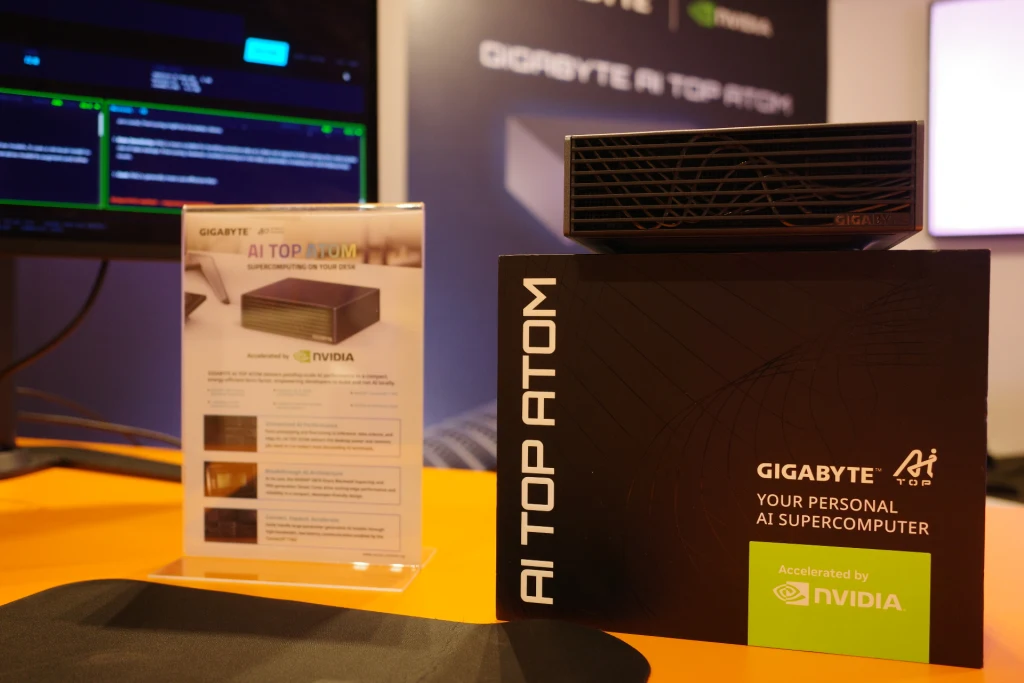
The Gigabyte AI Top Atom solution / Photo credit: Gigabyte
It’s also tiny. It fits in a 1-liter chassis, weighs 1.2 kilograms, and runs on a 240-watt adapter, so you don’t need a server room; you just put it on your desk and take it anywhere you want to go. This direct connection means firms get a more reliable solution for processing AI workloads and reduces the need for complex networking infrastructure in some cases.
Lastly, AI Top Atom is meant to grow with business needs. It comes with an Nvidia ConnectX-7 network adapter, so users can link units together to do clustering when they need more performance to run a bigger LLM.
Could you walk us through a real-world case study showcasing the benefits of having local AI hardware?
We worked with a top Taiwanese medical center and provided them with our AI Top Atom solution.
Normally, for each patient, radiologists had to manually mark vessels across 600 to 700 CT scan slices. With AI Top Atom running in the hospital, the full pipeline went from about 45 minutes to two minutes. Results are more consistent, and most importantly, patient data never leaves the hospital, which gives the client the best of both worlds: speed and data security.

Photo credit: Shutterstock
Meanwhile, in Sydney, reasoning-AI company Cognitivo was developing in the cloud and paying for both time and tokens. It moved the process to AI Top Atom, which cut those costs and let it test customer workloads securely on-premises. It’s also small enough to carry, so the sales team could take it to client meetings for live demos, which is the best way to win over hesitant prospects.
Could you list or give some examples of scenarios that would be best suited for offline and online workloads?
Here’s a simple rule of thumb: Keep it local if it’s sensitive or if you use it a lot. Go for the cloud if you need the biggest models or need it only once in a while.
Local or offline is great for:
- Confidential stuff like legal, medical, financial, or HR files, as well as source code
- Training models on your own private data
- Places with weak or no internet connection, like factories or field sites
- Developing and testing software or any simulation without running up a cloud bill
Cloud or online is great for:
- Tasks that need the most advanced models, like video creation
- Occasional big jobs, like a one-time large training run
- Work involving public, non-sensitive data
- Early experiments conducted before you invest in hardware
It’s not exclusively cloud or local. The smartest setup is usually a mix of both.
Gigabyte is a global tech leader delivering high-performance computing solutions across gaming, AI, and enterprise applications. Discover how secure, on-premise AI can transform business workflows, and explore Gigabyte’s AI Top series solution here.
This content was produced by Tech in Asia Studios, which connects brands with Asia’s tech community. Learn more about partnering with Tech in Asia Studios.
Editing by Stefanie Yeo and Mina Deocareza
(And yes, we’re serious about ethics and transparency. More information here.)




📅 Upcoming Events
30-31 March 2027
Upskill Fest