 Paul Bischoff · · 4 min read
Chrome with Chinese characteristics: the world’s hottest mobile browser arrives on desktop

“Wow. That looks a lot like Chrome,” was the first thought that went through my head when I first opened up UCWeb’s new PC browser for Windows. Everything – tabs, URL bar, bookmarks, menus – all look nearly identical to Chrome, except for the blue squirrel in the corner. It soon became clear that UC Browser for PC was not built from the ground up. In fact, it’s not much more than a skin built on top of Chromium, the open-source framework that Google released to the public a few years ago.
But don’t call it a clone just yet. While Chrome holds about one-third of the desktop browser market share in China, 40 percent of PC users are still on Internet Explorer, according to StatCounter. Over half of those those Explorer users still use IE6, which will likely die out with the recently retired Windows XP. That leaves a growing segment of users looking for a new way to browse. Chrome, with its Google-heavy feature set, isn’t necessarily the best fit for Chinese users due to Great Firewall bottlenecks. UC Browser, however, could certainly fill that gap.
See: Led by UC Browser, China spends twice as much time on mobile browsers as last year
Under the hood
In a way, it’s the best of both worlds: all the functionality of Chrome tailored for mainland Chinese users. Feel free to download and install extensions from either the Chrome Web Store or UCWeb’s own ecosystem. Savvy code junkies have access to the same developer tools as they do in Chrome. The only significant parts missing from the original were Chrome’s PDF viewer and built-in Flash Player, so you’ll have to resort to Adobe for those.
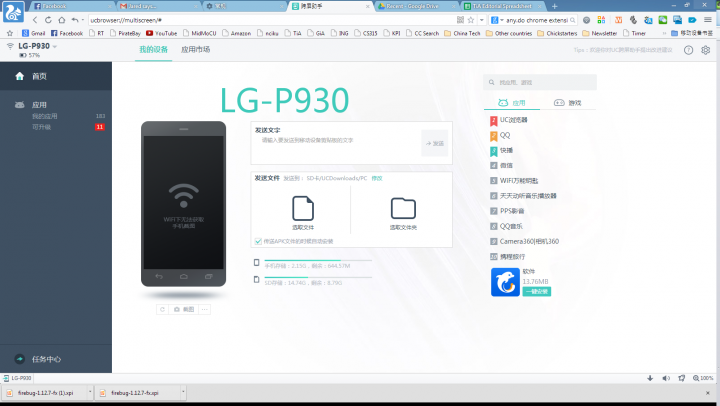
Where UC Browser for PC really shines, though, is the seamless integration with its forefather, UC Browser for mobile. The world’s most downloaded third-party mobile browser syncs wonderfully with the desktop version, and presumably the same goes for the recently launched Smart TV edition, although we didn’t get a chance to test that out. It’s easy to sync pages and bookmarks between devices. If I have a page up on my computer that I want to send to my phone, I just click the QR-code button on my browser’s URL bar (as shown above) and scan it with the mobile browser’s built-in scanner. Then there’s the Android management interface, which allows users to download, install, and manage apps on their phones from within the PC browser. You can also send files and short messages between devices.
Another perk includes dual rendering engines: Chromium’s Blink works for most stuff including HTML5, while Microsoft’s Trident steps in for pages designed to be used with Internet Explorer – this is a necessary requirement for many Chinese websites, including online banking. UC Browser detects and automatically switches to the preferred engine, or users can toggle it manually. We’ve also seen this in Baidu’s browser.
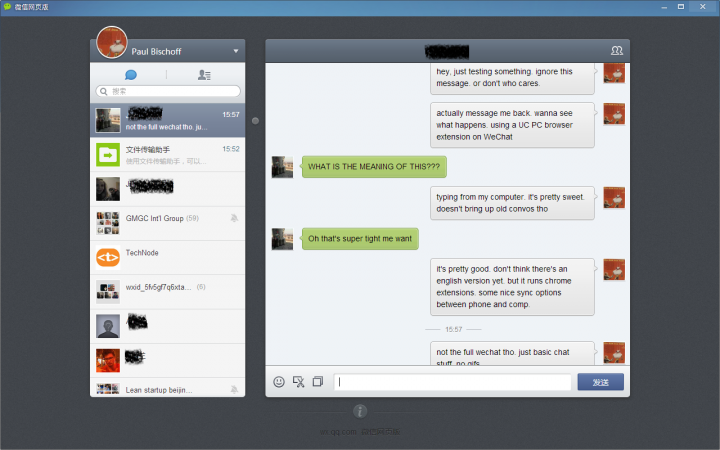
Other fun gimmicks include a button that turns your computer into a personal wi-fi hotspot for your phone – provided you have the necessary equipment – cloud acceleration, infinite scrolling, and pre-fetching pages. There’s also an official WeChat extension that works as a popout window, which means Windows users can finally get the popular messaging app on their desktops. It’s limited to bare bones chat functions for now, but it’s sure to entice a few of the app’s 355 million active users.
Overall, UCWeb has come up with a solid PC browser that strikes a balance between the functionality of Chrome and the needs of the average Chinese netizen. I only found a couple negative quirks during the short time that I spent with it – I couldn’t use a VPN through the OpenWeb protocol (OpenVPN works fine) and I couldn’t get our site’s WordPress backend to load – but I didn’t spend much time troubleshooting. While mostly bloatware-free, there are some tie-ups with Alibaba that include Taobao, Tmall, and Alipay integration by default.
UC Browser for Windows is still technically in open beta testing, so more improvements are sure to come. It’s aimed squarely at the Chinese market for now, with no word yet on an English version.





Stay updated on the go with our mobile app.
Get latest insights with smoother, more personalized experience through TIA mobile app.








📅 Upcoming Events
22 October 2026
Payoneer x CSPN Summit 2026