 Steven Millward · · 4 min read
Baidu’s ‘App-ified’ New Homepage Wants You to Hang Out [REVIEW]
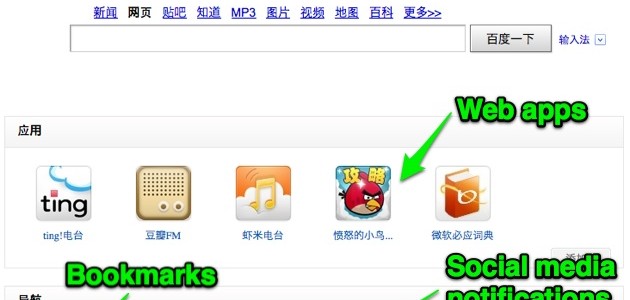
Baidu’s CEO Robin Li unveiled a revamped search engine homepage last Friday at its annual conference, and it immediately went live for registered users. It brings web apps, bookmarks, and trends to the frontpage, so that users can truly make it a home on the web. It means you can stream music from Douban or play Angry Birds from right on Baidu.com. So let’s take a look at what comes with this new, ‘app-ified’ approach.
First off, you’ll need to sign-up for a Baidu account, and then sign in to get the refurbished homepage. Once you do, it’s a bit blank, but with a few minutes of customization, it’ll be more cozy. (Long-time Baidu users will see more information at first launch). From playing around with it, I can discern five keys things that you can do:
1. Connect Social Media Accounts
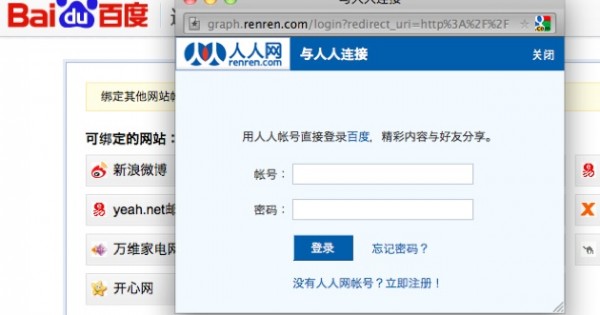
You can connect lots of social sites (see the screenshot below) to the new Baidu.com, such as Sina Weibo, Renren or Baidu’s own streaming video service, Qiyi. That enables notifications from all your connected services right on the Baidu.com homepage. Currently there are 15 SNS that permit this third-party login.
This makes China’s biggest search engine into a kind of social dashboard that can notify you of new comments, mentions and messages on all the sites that you’ve chosen to connect. Only thing is, it’s only for notifications; you’ll still need to go login to your other profiles to check out what’s going on.
2. Add Web Apps
This is actually the main feature of the frontpage revamp – enabling web apps to play within the search engine’s main page without navigating away. It’s clever and cute stuff. But it’s not new – it’s all part of the box computing tech that Baidu has been working on for years. It has been, without most people realising, embedding these web apps – or widgets, or whatever you want to call them – into the search results page. It’s just that now, for the first time, they’re hitting the front page.
So, to add an app, just browse Baidu’s huge catalog of browser-based games, utilities, or books. In the top screenshot you’ll see I’ve picked three music apps (including Baidu’s own Ting), Angry Birds, and Microsoft Bing’s online Chinese-English dictionary. To choose one, just click it to move it to your collection. Later, when you hit an app icon, it launches in its own frame on that same page (see the streaming music app, pictured below).
These web apps – which are made with a mix of HTML5 or Flash, depending on the third-party developer – also feature in the Baidu Browser, which launched back in July.
3. Add Bookmarks
These are added manually, but are prettified with a favicon for most sites. As with the four core frames on the new Baidu.com (see numbers two to five in this list), the whole thing can be removed if it’s not useful to you.





Stay updated on the go with our mobile app.
Get latest insights with smoother, more personalized experience through TIA mobile app.








📅 Upcoming Events
22 October 2026
Payoneer x CSPN Summit 2026