You need only one look at the Ouroboros to tell it’s marketed as a premium product from Razer. There are no cardboard boxes (however sturdy) for this mouse: it comes in a see-through cube, replete with a little stand, with its packaging and manuals tucked away in the base. It’s like an expensive airplane model, made with love and mounted in a fibreglass box for the world to admire.
The Ouroboros is named after the serpent forever doomed to eat its tail, and it’s easy to draw some similarity between that cyclic symbol and the ambidextrous mouse. Unlike some of its cousins, Razer’s Ouroboros mouse is for both left and right handers, which makes it a good buy – if you’re willing to drop the cash on it.
With its premium look comes a premium price tag – the 8200 DPI Ouroboros is a hefty $149.99. And the question undoubtedly is: does it give a premium performance too?
Form
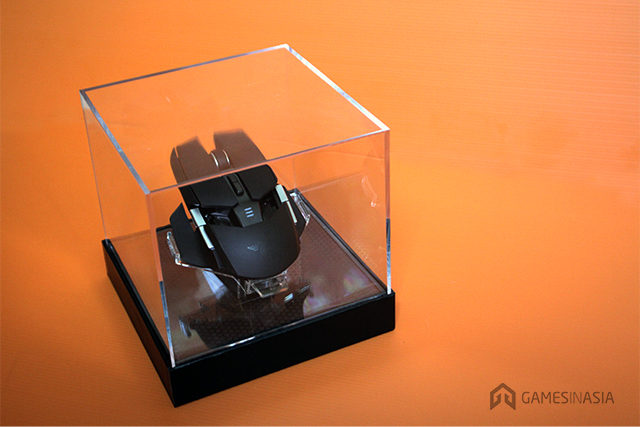
It’s not a pretty mouse. Unlike its sleeker peers, the Razer Ouroboros goes for the broken silhouette much needed when you create modular mice (see the Mad Catz R.A.T. series).
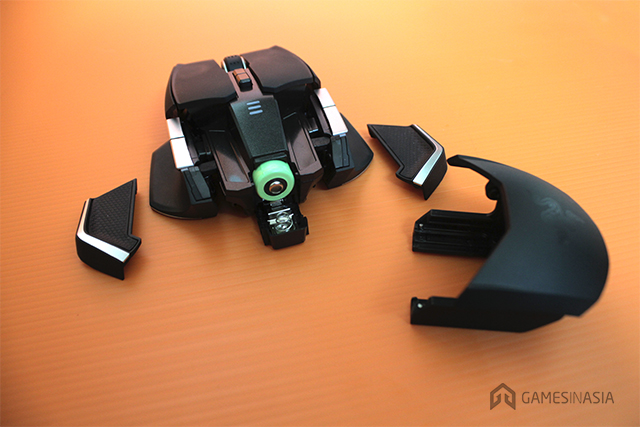
Its buttons and side panels are broken up, with ‘wings’ or finger rests on the side, and its length can be adjusted to suit your grip. The Ouroboros also keeps the long, square topped buttons you see on many other Razer mice, and tops them up with two extra buttons on either side, as well as a sensitivity changer in the centre. These buttons are coated with a semi-rough, matte plastic that gives a great grip, hyperhidrosis or not
As a wireless mouse, the Ouroboros does need some form of power, and this comes from a AA battery. Each mouse ships with a Razer-green-coloured rechargeable battery that can only be charged while in the mouse. This battery hatch is hidden away under the mouse’s palm rest, and can only be accessed by removing the latter panel – an engineer’s work of art on its own.
The Ouroboros can be charged on its stand or via direct USB connection. The stand also requires a USB connection, given how it’s what pairs the mouse with your PC. The pairing process for the Ouroboros is easy, though. It’s not automatic, but rather requires you to simply press the stand’s button at the same time as you hold down on all of the mouse’s four side buttons. Once the light stops flashing, you’re good to go.
Function
The Ouroboros performed the same whether wired or wireless, and made me one very happy camper. It gave me absolutely no problems whether used in a FPS game, an MMORPG, or simply to do my everyday work. It moves well, feels great, and the adjustable sensitivity via the centre buttons are super useful. Like the cyclic symbol that inspired its name, the Ouroboros is good for nearly anything you put it to. Instead of more praise, here’s where it fell slightly short of the mark.
Having loved a Mad Catz R.A.T. mouse, I was expecting more modular parts from the Ouroboros. As it is, I can only exchange the finger rests (or wings) for ones of a different material, as well as lengthen or shorten the mouse to suit my palm length. I cannot adjust its weight nor its sides, or make it fit into every nook and cranny of my palm. That’s really personal preference, though.
What is just surprising and disappointing when coming from Razer is its clutch-trigger function. This is a button on either side of the mouse that you depress when you need a sudden dip in sensitivity. Maybe it’s to position your crosshair a little more carefully, or maybe you need to draw a very careful stroke in Photoshop. It’s a very good concept and one that other mice have, but it’s not well executed in the Ouroboros.





Stay updated on the go with our mobile app.
Get latest insights with smoother, more personalized experience through TIA mobile app.