Paul Bischoff · · 9 min read
Oxygen vs Cyanogen: a side-by-side review for OnePlus owners
OnePlus One owners are at a crossroads right now. The young Chinese smartphone maker is ending its relationship with the maker of its Android-based operating system, Cyanogen, after the latter struck an exclusivity deal with rival brand Micromax in India. In dire need of an alternative, OnePlus chose to build its own fork of Android Lollipop, which it released earlier this month.
OnePlus owners looking to upgrade to the latest and greatest version of Android must choose between the two. The OnePlus ships with Cyanogen 11S, which is based on Android KitKat. That means OnePlus users can install Cyanogen’s updated version without having to manually flash a ROM. Oxygen was released prior to Cyanogen 12’s stable version, but it requires the know-how of savvy Android nerds to manually install. OnePlus is promising “an easier, more automated solution,” but for now it needs to be done manually.
So despite being released over a week later, Cyanogen seems to have the upper hand.
I decided to try them both. I flashed Oxygen first, which means I didn’t get the OTA update for Cyanogen and had to install it manually, too. This was my first time flashing an Android ROM onto a phone. I consider myself pretty good at this sort of thing and eventually got the job done. But when people say that you only should do this if you’re confident in your abilities, they are right. Flashing Android ROMs is a major pain in the ass, especially if you’re using a Windows PC, which doesn’t play nice with Android phone drivers.
Now then, onto the reviews. Click here to skip to Cyanogen 12.
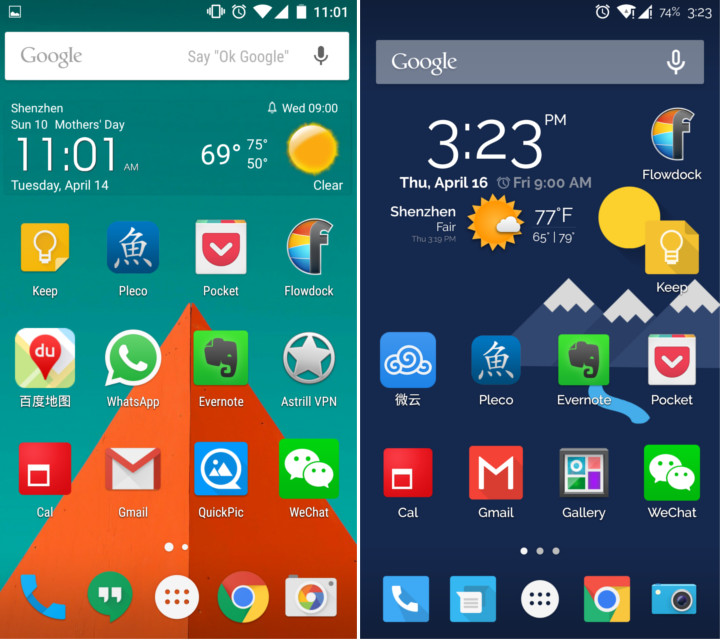
Oxygen (left) and Cyanogen (right) homescreens
Oxygen OS
Oxygen OS is a solid first effort by OnePlus, and for the average user, it will more than get the job done. As many have pointed out, it’s basically the Android Open Source Project (AOSP) with a couple extra features baked in. That makes it about as close to stock Android as you can get.
For those that have grown used to all the tweaks and tricks of Cyanogen, which of course is almost all OnePlus users, it’s very vanilla. Themes are pretty much non-existent. Whereas in Cyanogen you can customize everything from fonts to app and status icons to the way buttons look, Oxygen is pretty much limited to ringtones and wallpapers. Oxygen doesn’t allow for nearly as much customizization in the settings either. More on that in the next section.
Oxygen is stable, I’ll give it that. I didn’t come across any major bugs or crashes. You can find a list of known issues here, along with the manual installation instructions.
Gestures, such as drawing a circle on the dormant screen to open the camera or a ‘V’ to toggle the flashlight, work well, but there’s no option to add your own. There isn’t on Cyanogen, either.
For those who like their Google apps, you’re in luck. Since this is almost stock Android straight from Google and OnePlus hasn’t had much time to create their own alternatives, you get almost all of them. To everyone else, this borders on bloatware.





Stay updated on the go with our mobile app.
Get latest insights with smoother, more personalized experience through TIA mobile app.