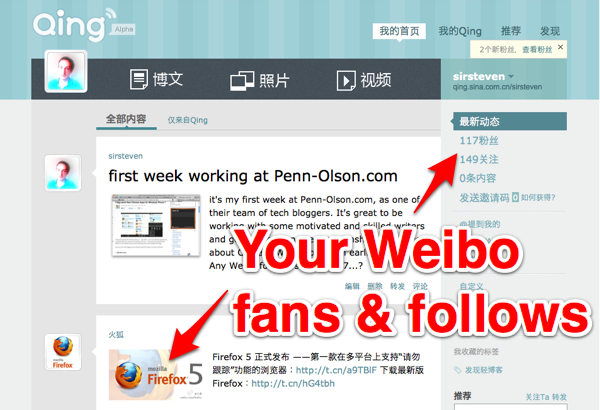
 Sina Qing is still in alpha-stage, invite-only testing, but I’ve gotten inside to take a look around – and, on first impressions, it looks a lot like a Tumblr clone. But more striking is how very integrated it is with Sina Weibo – the company’s smash-hit microblogging platform.
Clearly, Sina wants to extend vertically, giving its users the full run of 160-character tweeting on Weibo, super-fast blogging on Qing, and then their more traditional offerings of portals, profiles and old-style blogs (on blog.sina.com.cn), all under the remit of one Sina ID. It’s all about engaging, and keeping users on your domains, and getting them sharing more things. No doubt corporate Qing pages will appear in due course.
But Sina Qing and Sina Weibo are especially closely-linked. If you’ve used Weibo already, then upon signing-in to Qing you’ll notice that all your ‘fans’ and the people you follow are listed already – they might not be using Qing too, but nonetheless all the activity of your Weibo buddies is in your stream. With a toggle on the main Qing homepage, you can switch between viewing your entire Weibo+Qing stream, or just content that friends have shared on Qing.
Re-tweeting and commenting
Yes, just as with Sina Weibo, there’s the dual engagement option of re-tweeting or commenting upon something interesting in your stream. If you re-tweet someone’s microblog, then it goes back into the stream of all your followers. But, that re-tweet won’t appear on your personal page.
Posting
As with Tumblr, there are numerous options for how to post on Qing – well, only three, in Qing’s case, but this might grow with time. For now, you can post text with an optional photo, or just a photo, or just a video. With the video, all that’s needed to post is a single link, making it as fast as sharing an item as on Weibo, or on rival SNS such as Renren.com.
At the moment, I can’t see any way to post via email, which is one of the killer features of Tumblr and Posterous, who first pioneered this type of ninja blogging.
Customizing
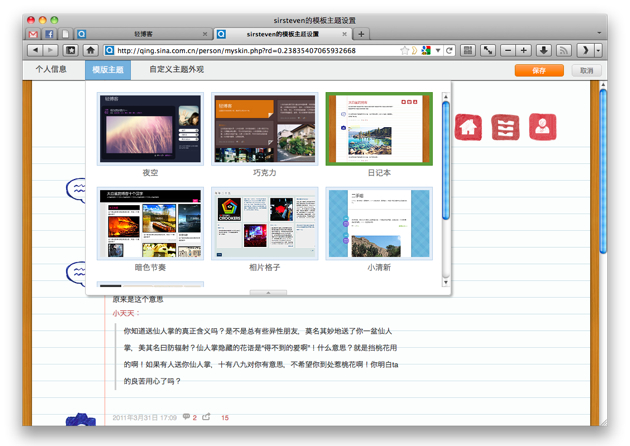
Qing most closely resembles Tumblr – that über hip blog platform – when it comes to customizing, or ‘skinning’ your Qing. For the moment, the choices are very limited, but will likely expand with time.
Here are five more choice snaps from my first day on Sina Qing:
Firstly, you might want to skin your page…
then do a lightning-fast post on it…





Stay updated on the go with our mobile app.
Get latest insights with smoother, more personalized experience through TIA mobile app.













📅 Upcoming Events
30-31 March 2027
Upskill Fest