- Insights This article was written by a TIA community member. Insights pieces undergo the same rigorous editorial process that newsroom-produced articles have.
 Brian Sheridan · · 5 min read
Getting your app from wireframing to prototyping to user testing
Copyright: frbird / 123RF Stock Photo.
Moving an idea out of your head and into the market is not a simple process. There are a lot of obstacles which can get in the way if you let them. But, if you follow a few simple rules, then you can minimize these difficulties and get your idea into the hands of real users much more quickly.
We have talked a lot about idea validation recently and this is an essential part of the process.
Once you are happy that you are working on a real solution to a real problem, you can start designing the solution. If you think this is going to be a simple process then you are wrong. There are an intense number of stages.
Wireframing
According to ExperienceUX: Wireframing is a way to design a website service at the structural level. A wireframe is commonly used to lay out content and functionality on a page which takes into account user needs and journeys. Wireframes are used early in the development process to establish the basic structure of a page before visual design and content is added.
Lesson 1: start with mobile
You have the solution in your head and you know that you are going to work on an app-based design. Now, the first lesson is you should always start with mobile.
Mobile first is a concept that was championed by Luke Wroblewski.There are pros and cons to the argument for mobile first as a concept, but we have to begin somewhere. The basic reason for going with mobile first, in my view, is that you are going to be putting your app in the hands of users. Going this route will improve the feedback that you will get.
Lesson 2: ignore trends
So, you are going to design an app for a mobile device. Lesson two is to ignore trends completely. The first stage is to sketch out the broad superstructure of the app: basically the skeleton.
This can be done very easily on paper. This is usually the best place to start because you can quickly move through the screens, rearrange them as you go, and move through numerous drafts quickly.
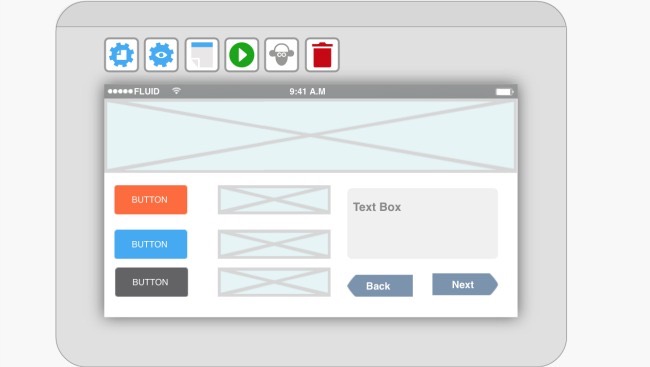
Once you have got to the stage where you are happy with the basic design of the wireframe, you want to start putting it onto the screen. An app that helps with this is Fluid UI, which can achieved this even quicker than paper wireframing.
Prototyping
User Testing





Stay updated on the go with our mobile app.
Get latest insights with smoother, more personalized experience through TIA mobile app.











📅 Upcoming Events
22 October 2026
Payoneer x CSPN Summit 2026