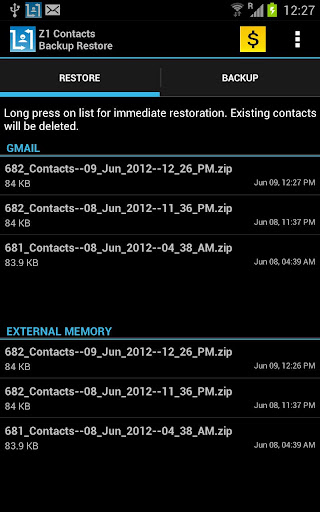
iPhone and Mac users usually have their contacts all synced with their Address Book app. And for Android users you can use Google sync to sort out your Google Contacts, for sure – but that neglects the other non-Android phones. So perhaps you can use the ‘Z1 Contacts Backup Restore’ app built for backing up contacts from Android devices to other devices.
The Z1 app pulls your phonebook and Gmail data and saves them in vCard/.vcf file format. Once the data is saved, it will send an attachment of your entire contacts to your Gmail account. With this contact .vcf file, you can now log on to any phone that supports the .vcf format to have your contacts saved in each device’s phonebook. This way, you are sure to have the same contacts as are in your Android devices. Using it is simple, all you have to do is to log in to your primary Google account with IMAP enabled.
Z1 was developed by Optinno Mobitech, an India-based company. The app first launched at the BeLaunched conference recently in South Korea. The app comes with a 30-day free trial with and all premium features enabled. After the trial, the app still works but free users will not be able to receive the .vcf files automatically via email. But there’s a workaround as users are still able to download the contact file manually from Gmail. The app isn’t exactly well designed, but it does serve its cross-platform contact backup purpose pretty well.
You can give Z1 a try at the Play Store here. Let us know what you think.





Stay updated on the go with our mobile app.
Get latest insights with smoother, more personalized experience through TIA mobile app.