 Rick Martin · · 5 min read
Japan’s Ambitious New Sleipnir Browser and Smartphone App Linker [Review]

I’ve been a fan of the Sleipnir browser for a while, first attracted by the notion of a Japan-made browser a few years back. I’m not a regular user of Sleipnir, mind you. Just a fan. I like that there’s choice like this out there. But on my Mac I stick with Chrome primarily for speed and a few preferred extensions.
So when I heard about the latest version of Sleipnir 3 from Fenrir Inc. that integrates with a ‘Smartphone App Linker,’ I confess I was curious enough to try it out for a while.
In Sleipnir version 3.5 for Mac (Windows is also available) there are a few things that I noticed right away. First, the URL bar is a little unconventional in that it’s hidden away in the top right corner. Once you click it, it expands to what would be a more conventional full-width display. Tabs are compact, and actually display a snapshot of the website of that particular tab (see picture below).

Top of the Sleipnir browser for Mac. Note that I compressed the width so that the screenshot would fit here.
But the Smartphone App Linker was the featured function here, and it is indeed useful. It took me a while to realize that the App Linker was actually an entirely separate app that you need to install (get it here on Google Play, iOS coming soon) [1]. But once I did get it installed I really enjoyed the functions a lot. When viewing phone numbers that are listed on a website in your Sleipnir browser for Mac (or Windows), you will see that they suddenly appear clickable, so you can send them to your smartphone immediately. The best way to show how this works is by showing you the company’s own video demo:
Similarly, if you were to highlight an address of a restaurant or company on your computer, you can send that to your smartphone too. From there you are given the option of viewing the address on Google Maps, which is a handy feature if you’re heading out to someplace new. But in the App Linker Android application, I don’t see any way of sorting through past clippings you have sent to your phone (there’s no search or filter), so it looks like it is focused on solving an immediate PC-to-phone text snippet transfer rather than serving as any sort of Evernote-like text clipping archive [2]. But I digress…
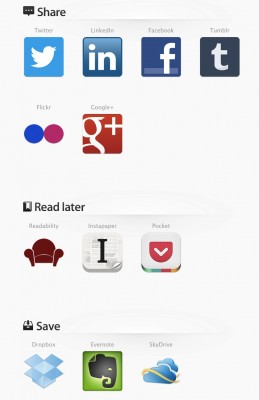
Fenrir Pass Connect
Getting back to our Mac and the new 3.5 browser, if you access the Fenrir Pass Connect Page, you’ll see that there are a number of social services to which you can share content, including Twitter, Facebook, Google Plus, and Tumblr. It took me a while to discover that just below those, there are even more integrated services, like Readability and Instapaper for when you’d like to save articles to read later. And below that there are ‘Save’ services, including Dropbox, Evernote, and Skydrive. With these, you can send screenshots of the current page (as pdf or png) to your preferred service, which is kind of nice. But images aren’t really searchable, so good luck finding what you’re looking for later if you use this function frequently. For Dropbox, it would be nice to be able to specify a sub-folder to save to as well [3].
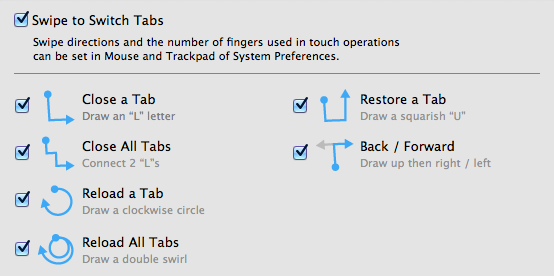
Oh, I almost forgot about the fun gesture controls. Well, they’re fun when they work, although I confess I had a some difficulty with this. If you try out the browser your success with the gestures may vary depending on what touch interface you are using (trackpad, magic mouse, or magic trackpad). I found that on my Macbook’s trackpad, I gradually got better results using two fingers and keeping my motions compact [4]. The gestures can get pretty elaborate, and I could not get many besides the simplest ones to work. Perhaps some Infinity Blade players might have better luck. I still really like Sleipnir Mobile’s gestures on the iPad though, and you can check out my past overview of that here.





Stay updated on the go with our mobile app.
Get latest insights with smoother, more personalized experience through TIA mobile app.











📅 Upcoming Events
22 October 2026
Payoneer x CSPN Summit 2026