I’m a bit of a Twitter addict, I’ll admit it. And because I occasionally do some crazy things in my personal life, I like the idea of being able to post to Twitter easily from anywhere in China, regardless of VPN access or even wifi/3G access. Once upon a time, you could register your Chinese mobile phone with Twitter and post tweets via SMS, but no longer. And my previous workaround doesn’t work anymore because Fanfou has sadly removed its bind-to-Twitter function. Update: Turns out this is back up and running again, so either of these methods will work. Given the choice, I’d say set them both up just to be safe, but use the Fanfou one as your primary because it’s much faster.
Before we go any further, I should tell you that this solution probably isn’t for everyone. It involves a lot of compromises, and the end result is far from perfect. It is also going to be a little difficult if you can’t read at least a little Chinese. But if you really want to be able to post to Twitter from anywhere, so long as you get mobile phone reception, here’s a roundabout way to do it. (Note that you could also use a similar workflow to update other blocked social media sites, like Facebook).

Step 1: Register a new Sina Weibo Account
You can use any Sina Weibo account, of course, but I wanted to keep my personal account separate and create an account that was used only as a channel to feed posts to Twitter. Also, for this to work, you’ll need to bind your phone to the weibo account, and you may not want your phone number and ID info associated with your “real” weibo account. So I set up a whole new Weibo account, and I recommend you do too. Make a few quick test posts to help with the next step. Then click on your account name, which is on the upper right side of the screen in the top nav bar. When that page loads, there will be a number right after “weibo.com/” in the URL bar. Copy that number. (In the illustration below I’ve blurred my personal details, but you get the idea.)

Step 2: Find your RSS feed link
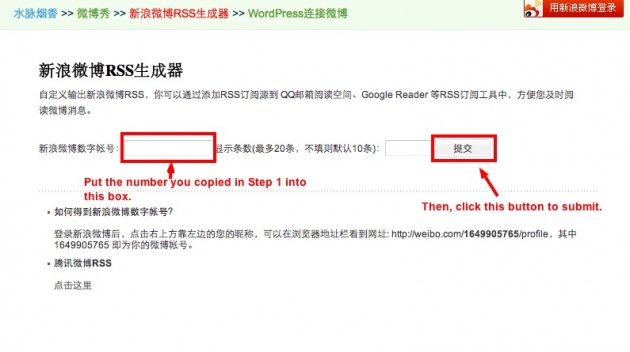
For some reason, Sina makes it very difficult to find the RSS feed for your weibo account. Luckily, someone else has created a tool to help us do just that. Click on this link. On that page, fill in the number you copied in step one, and then hit the submit button as illustrated below.
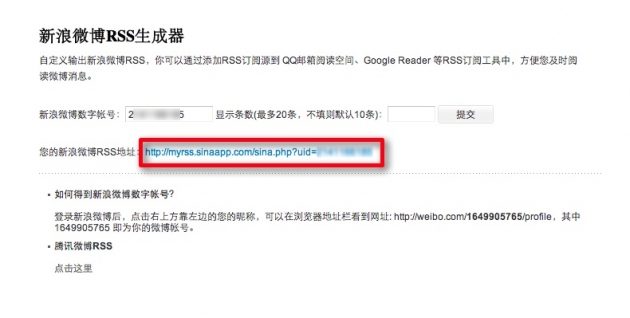
If you’ve done that correctly, you should get something that looks like the image below. See that link I highlighted in red? That’s your RSS feed, so copy that link. Click on it to double-check it’s working properly. It will look like a mess of code, but somewhere in there you should see the text of the test messages you posted to your Weibo in Step 1.





Stay updated on the go with our mobile app.
Get latest insights with smoother, more personalized experience through TIA mobile app.