
Nubefy announced last week the launch of its private beta where a select group of partners and customers will be invited to try Nubefy out and provide feedback. This enables the startup to refine and improve their product offering to the public. The public can also try to get in the beta by signing up for a Nubefy account at www.nubefy.com.
What exactly is Nubefy?
Nubefy is a cloud based service that enables companies to easily manage their cloud based servers from among multiple providers like Amazon EC2, IBM, Joyent, Softlayer, Microsoft’s Azure, RackSpace and a host of other public cloud providers.
Nubefy provides several advantages to companies migrating to cloud based providers.
- It is easier to use: A single, unified web-based console that shortens users’ learning curve in managing all their hosted services hosted at multiple providers. No need to learn multiple hosting methods to work with multiple providers. You just need Nubefy to do it all for you.
- Faster deployment: Nubefy’s pre-built templates help you to deploy the same configuration across several cloud hosting providers.
- Easier Administration: The central console lets you see key metrics and events from a single location so you don’t have to login to multiple providers to get the data. The use of nScripts simplifies remote management and configuration tasks.
- No Vendor Lockdowns: This system help users to easily migrate from one provider to another. Users can thus avoid being ‘locked’ down to any single cloud provider. Since builds are going to be standard, bandwidth is saved by avoiding the transfer of the build, only the changed data gets sent across the wire.

L-R: Sujeevan Nagarajah, Kethees Selladurai, Eric Meyer (CEO), Pawel Leja, Ashima Sharma, Su San Neo
Eric Meyer, CEO of Nubefy, showed me the entire process as diagrammed below. In about 10 minutes, Nubefy was able to provision a Linux Build in Amazon from a prebuilt template. I did not even have to consult the Amazon User manual.
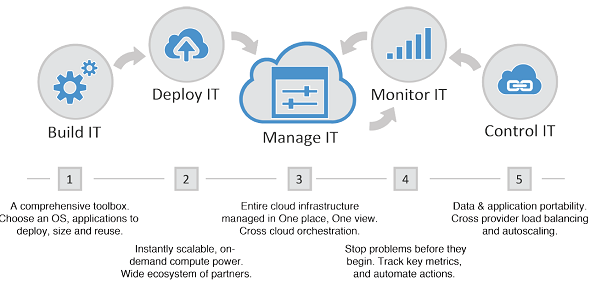
I could even select where in the world the build should be hosted in.
Once the build was ‘deployed’ in Amazon, Eric showed me the SSH (Secure Shell) or Terminal Services that could be used to manage the hosted server (SSH and Terminal Services are industry standard methods for users to manage and configure their servers).
There were also easy buttons that could be used to create backups, clone (make duplicates) builds and monitor server events. Applications like Drupal, Joomla, Mysql, Sugarcrm and WordPress (among a host of others) can be easily deployed from inside Nubefy.





Stay updated on the go with our mobile app.
Get latest insights with smoother, more personalized experience through TIA mobile app.









📅 Upcoming Events
22 October 2026
Payoneer x CSPN Summit 2026