 Willis Wee · · 4 min read
How to: Customize your Twitter Background with an “Intro Pitch” (Photoshop)
 Having a great customized Twitter background is akin to dressing fashionably; the latter gets you a great first impression and the former, more followers.
The purpose of customization is to have something that is entirely your own.
Bumping into somebody wearing the same thing as you on the streets can be equally awkward as having the exact same Twitter background as somebody else. To avoid all that, a few creative minds came up with the idea of adding an “Intro Pitch” to their Twitter background.
Intro Pitch
An “Intro Pitch” allows Twitters to introduce themselves, put a picture and link their profiles to other social media tools. A brilliant idea isn’t it?
Before you scurry to design your own “Intro Pitch”, I have pre-empted some problems you might encounter and came up with a short cut for you.
The Design and the Fit
As with clothes, first we need to make sure we pick the kick ass design and also the right fit. There are the standard sizes such as S and L but it is not only until we try them on that we know if the fit is perfect for us.
I have no problems with your taste in background designs but I can definitely help you out with the fitting. To get that perfect fit, it usually requires precise measurements and a great deal of trial and error, especially with so many different screen resolutions to observe.
How the Dimensions can affect your “Intro Pitch”
Screen resolutions differ depending on your viewers’ computers. If your viewers’ screen/browser window is too small, your full background might not be displayed, resulting in an out-of-line profile. To have a rough gauge on what exactly viewers are seeing on smaller screens/windows, drag your own browser window in and out to simulate different screen sizes while you are on Twitter.
The common screen resolutions for laptops are 1024 x 768 pixels and 1280 x 800 pixels, and for monitors it is typically 1280 x 1024 pixels.
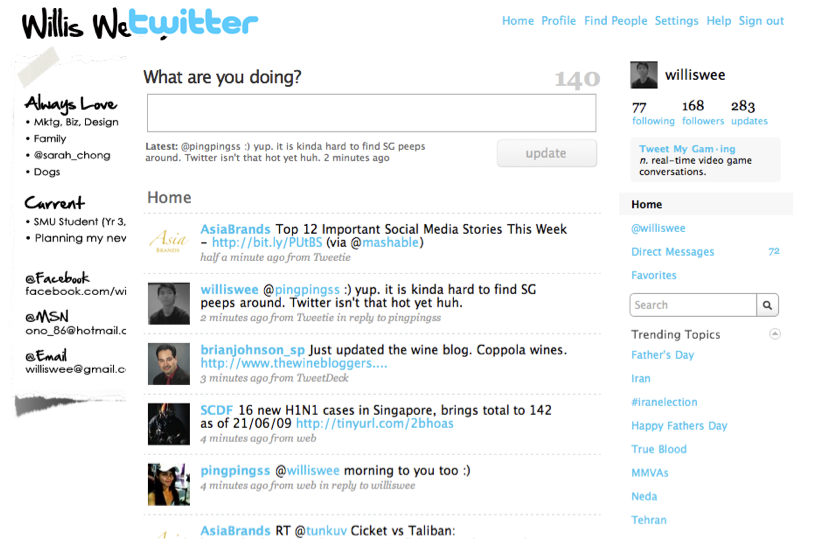
Viewed on 1024 x 768 pixels when browser is maximized on screen





Stay updated on the go with our mobile app.
Get latest insights with smoother, more personalized experience through TIA mobile app.









📅 Upcoming Events
22 October 2026
Payoneer x CSPN Summit 2026