 “To see a world in a grain of sand, And a heaven in a wild flower, Hold infinity in the palm of your hand, And eternity in an hour.” ~ William Blake. While most of us would have much trouble grasping infinity, we can quite literally hold our PC in the palm of our hands.
Imagine as you find yourself somewhere in the Middle East and want to continue working on that blog post in MS Word or surf the news using Firefox. But seeing as you did not bring your laptop while backpacking, in you trot into an internet cafe and sit at one of the computer terminals.
It starts up really fast, everything loads. But there’s a problem, everything is in Arabic – an alien language to you. With I-Flapp Technologies’ i-Mtop, you can now connect to a foreign language-based PC and continue surfing the web and working on your documents all in your native language environment.
Why It Is Unique
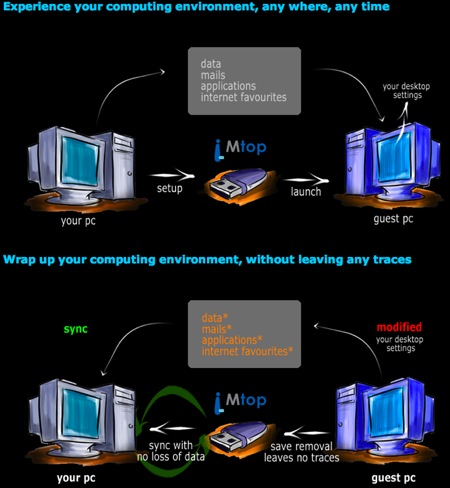
This patented technology allows you to port your personal computing environment (applications and data) easily to a new computer on any external storage device such that you can operate on a foreign PC as if you were working on your very own.
However, this only works for any Microsoft Installer (MSI)-based applications. So Mac users have to wait for the Mac version to be released sometime next year, though if you use a Windows virtualisation software like Boot Camp or Parallels, the technology will still work for you.
And for those worried about security, the company assures us that all data and applications that were on your external disk will all be removed when you remove the drive.
How It Works
Similar Products
While another local company Hibernater seems to be offering the same capability, what’s different about i-Mtop is that no software download is needed on the guest PC and all one does is to plug, play, remove and sync back with your original PC.
Another company that is more similar to i-Mtop is iTwin. (To recall what iTwin is, check out our interview with its founders.) There are several differences between the two. The main one is that while i-Mtop allows you to carry within your external storage device your applications and data, iTwin is more of a 2-sided key that requires internet connection to access the files you have on the other computer (where the other “twin” is).
So while all three products allow users to achieve more or less the same thing, they do it through three different ways.





Stay updated on the go with our mobile app.
Get latest insights with smoother, more personalized experience through TIA mobile app.