 Kheng Meng Yeo · · 6 min read
I partially reverse engineered the NDP 2016 LED wristband. Here’s what’s inside.
The Singapore National Day Parade (NDP 2016) happened on 9 August 2016 to celebrate its 51st birthday. For those who had the opportunity to attend the actual parade or its previews/ rehearsals, they will also get to receive a funpack where one of the items is a wearable LED band made by a company called Pixmob.
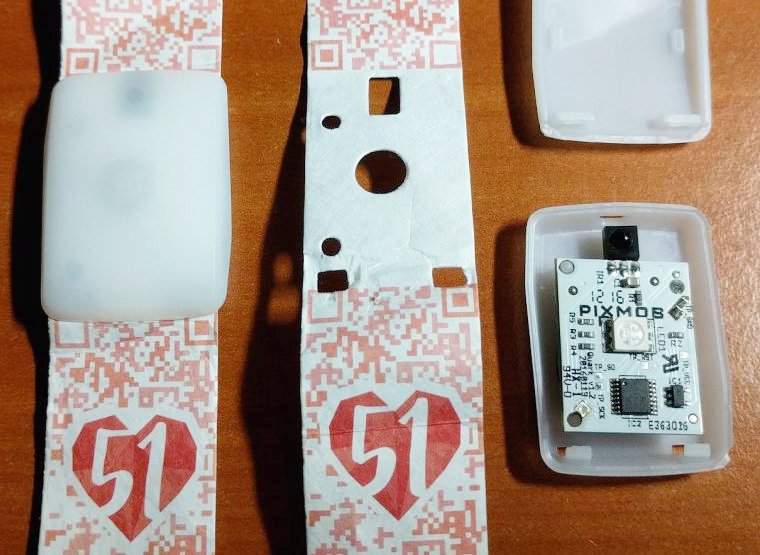
This band receives infrared (IR) signals from the organisers and then displays the LED colour of their choice. There is also an onboard accelerometer. After the event when the IR signals disappear, the (single-axis I believe) accelerometer will cause the red LED to light up when a shock is detected.
I had the opportunity to attend the Preview 2 (or rehearsal) of this event on 30 July 2016. Here are 2 videos of the wristband in action during the NDP Preview 2.
Each segment is given a particular colour theme and the band blinks in tandem with what the organisers want.
You can see how the colour changes during the show.
So obviously I was curious about how this wristband works. A look at Pixmob website shows they have 2 products to cater to different audience capacities
- Professional (1,500 to 150,000 attendees) that runs on infrared
- Spark (Up to 1,500 attendees) that runs on Bluetooth Low Energy
Since the National Stadium where NDP2016 was held has a capacity of 55,000, it had to the former. I believe how the system is set up is that there are numerous infrared emitters placed around, possibly on the ceiling of the stadium, to reach all the audience.
That is however not enough, I wanted to know more! So I proceeded to the teardown.
Teardown
I cracked open the case to reveal the following:
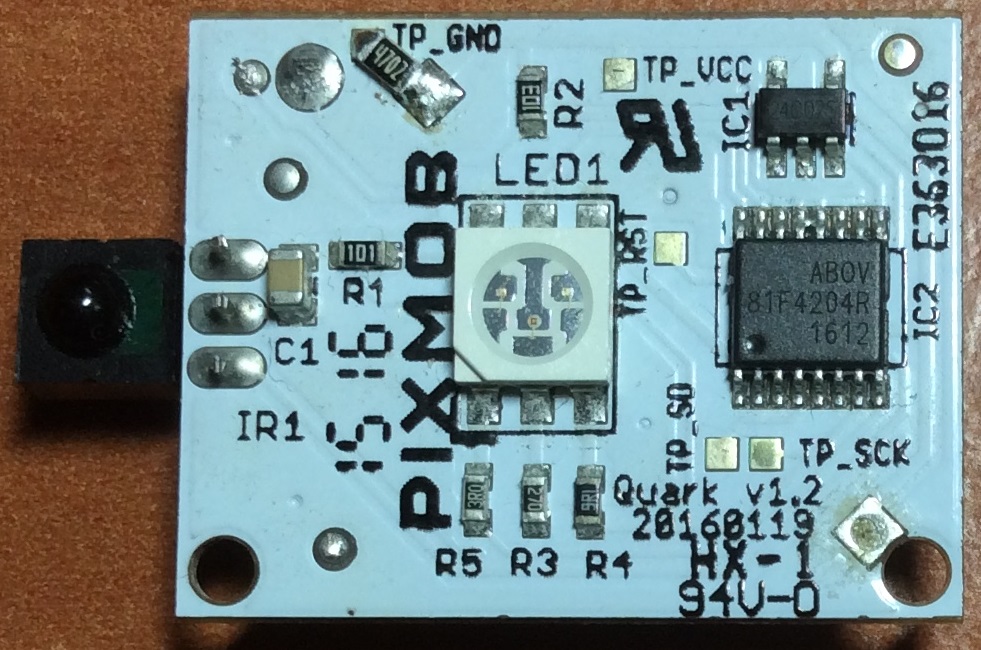
Hardware reverse engineering
Programming pads
Connection between host chip and EEPROM
EEPROM write-protection is not enabled
R2 and R6?
Unsuccessful attempt to brute-force the IR combinations
My IR brute-forcer
Brute-force conclusion
Concluding remarks





Stay updated on the go with our mobile app.
Get latest insights with smoother, more personalized experience through TIA mobile app.








📅 Upcoming Events
22 October 2026
Payoneer x CSPN Summit 2026