 Willis Wee · · 2 min read
DeNA’s Drowning review: blasting zombies and re-working mobile FPS controls
Developed by DeNA, Drowning is a first person shooter (FPS) mobile game available on iOS devices. The game is similar to Left4Dead. But instead of four friends, you alone will be clearing the horde of zombies. Drowning has eight parts to its story, with awesome voice over and art. At each stage, you can get a maximum of five stars depending on your score. The more stars you have, the higher the chance to receive rare items such as new guns or parts to fix up or upgrade your guns.
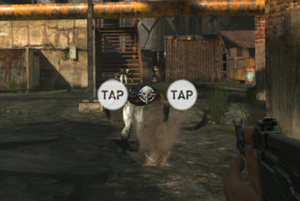 It’s refreshing to see DeNA working on an FPS rather than the usual social games we see from them. But Drowning isn’t an easy game, even for experienced FPS players. There is obviously no mouse and keyboard support, and the touch controls aren’t modeled on console controllers either (at least not by default). Instead Drowning uses two-finger gestures, and the space in between your fingers is the crosshair (see image). It’s definitely a different approach to controlling a mobile FPS.
And I can see what why DeNA did it. If you tap on the target to shoot, your own finger blocks the view of the zombie, so in theory, using two-finger gestures should work better. But in reality, I really struggled to aim at the zombies and ended up frustrated. Sure, I could hit them after several tries but I really hate to have to go through so much trouble just to fire a bullet at zombies.
Thankfully, for those who don’t like the default gesture controls, Drowning offers console-style virtual joystick controls as an alternative. This makes it much easier to move around and also aim at the zombies. It has a semi-lock-on feature that lets you lock your crosshair on zombies as long as they don’t move around too much.
Drowning takes some time to get used to, but it can be fun after much practice with the joystick controls. It’s sometimes frustrating, but the game is available for free, so there’s no reason not to try it out. You can give it a shot here with your iOS device.





Stay updated on the go with our mobile app.
Get latest insights with smoother, more personalized experience through TIA mobile app.












📅 Upcoming Events
30-31 March 2027
Upskill Fest