- Insights This article was written by a TIA community member. Insights pieces undergo the same rigorous editorial process that newsroom-produced articles have.
 Sau Sheong Chang · · 3 min read
ChatGPT spouting nonsense? Here’s how you can get better responses
We recently brought you a layperson’s guide to how ChatGPT actually works. But how can you make the world’s most famous chatbot work for you?
If you’ve spent any time on Twitter in the last few months, you’ve probably come across endless threads expounding on the many things you can use ChatGPT for. This isn’t another one of those threads but should give you some best practices to get the most out of the chatbot.

Image created by Chang Sau Sheong using Midjourney
What to be wary of
Occasionally, large language models (LLMs) like ChatGPT produce wrong or nonsensical results, known as hallucination.
LLMs hallucinate for a few reasons. First, they’re trained on massive amounts of text data, which contains both accurate and inaccurate information, so these models can sometimes generate the latter.
Second, LLMs don’t have common sense as humans do. They operate based on patterns in the data they were trained on, so if they encounter a question or topic they haven’t learned about, they might try to generate a response that sounds plausible but is actually made up.
Additionally, LLMs can be sensitive to slight changes in input phrasing, leading to variations in their responses. Sometimes these variations can result in inconsistencies or nonsensical answers.
There are a few ways to reduce hallucinations in LLMs, one of which is to improve training data, as more diverse and higher-quality data leads to more accurate responses.
Detailed human supervision, especially during fine-tuning, can also help mitigate hallucinations. Humans can provide real-time feedback, correct inaccuracies, and enhance the model’s ability to provide reliable answers.
Furthermore, a well-designed prompt can guide the LLM into providing accurate, on-topic, and non-hallucinatory results. So understanding how prompt design affects AI responses is crucial.
Prompt like a pro
A prompt is a short piece of text used to guide an LLM in producing a response. The idea is to give the model context or direction for what kind of text it should generate. There are several simple keys to writing good prompts:
- Write simply and with clear instructions.
- Different parts of the prompt should be clearly separated so the LLM isn’t confused. For example, if you want ChatGPT to summarize a portion of text into a single sentence, it helps to separate this text from the instruction by using brackets.
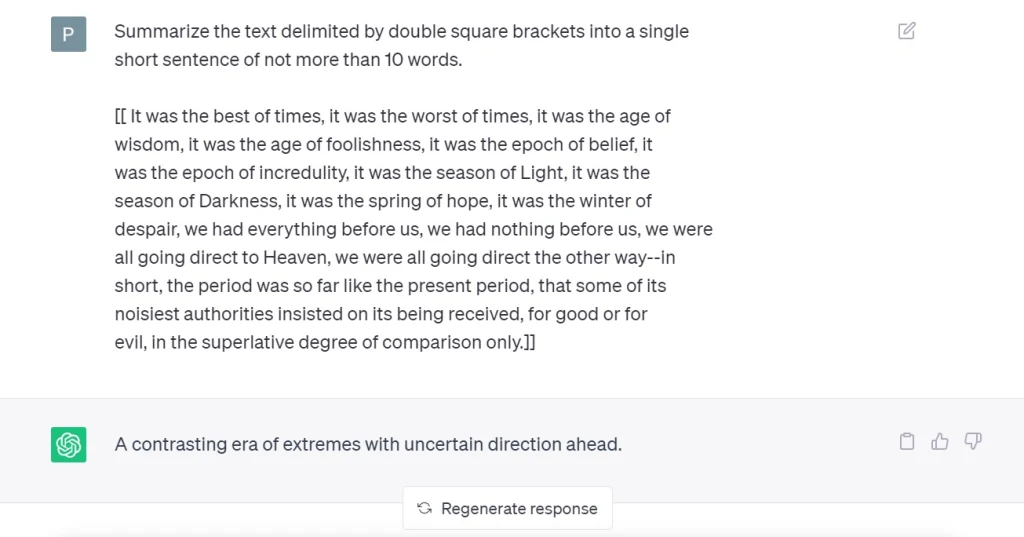
- Ask the LLM to check for conditions before providing a response to stop it from making things up when it doesn’t know the answer. In the example above, you would tell ChatGPT that if it’s already a single sentence, it doesn’t need further summarizing.
- Give examples of the type of responses you want before making the request.
- Provide steps to complete the task. If you know the exact steps you want the LLM to take to get the final answer, you should provide those steps to guide it along the way.
- Prompt writing is often iterative. You will write a simple one, then refine it over and over again, adding details and clarity until you achieve the kind of response you want.





Stay updated on the go with our mobile app.
Get latest insights with smoother, more personalized experience through TIA mobile app.