Paul Bischoff · · 2 min read
Forget Box, SkyDrive, and Dropbox, Tencent’s 10TB of free cloud storage is hands down the best
How much shareable cloud storage can you get for free nowadays? Dropbox, probably the most popular option, offers a measly 2GB in it’s free tier. Box and SkyDrive are a little better with 50GB and 25GB, respectively.
But what if I told you I just stored every video, document, photo, music playlist, and video from two PCs and my smartphone onto a single cloud drive, and I still have eight terabytes to spare? Add on to that, the clients across both mobile and desktop platforms are solid and easy to use.

Welcome to Tencent’s Weiyun. In July 2012, the Chinese web giant released its cloud service with a whopping 10TB of free storage, and it now reports 300 million registered users. This week, Tencent released an update that dramatically improved the interface and features. Only a Chinese version is available for now, but Tencent (HKG:0700) plans to launch an English-language version sometime this year.
The latest update comes with some pretty sweet perks:
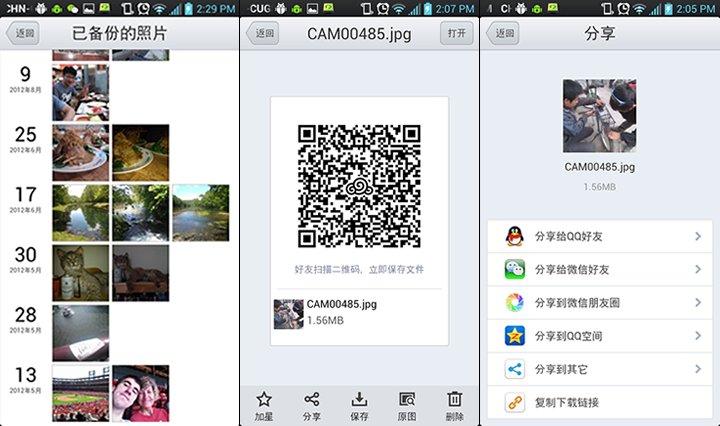
- In addition to the old short URLs, you can also create a unique QR code for any file or folder you wish to share.
- Weiyun will automatically update any files you modify.
- The photo album feature makes all your pictures easily viewable across the browser, mobile, and desktop clients.
To be honest, I didn’t care for the old version when I toyed around with it. My biggest complaint was that any file I wanted to store on the cloud from my desktop had to be manually placed inside one specific folder, rather than simply choosing which files and folders I wanted uploaded. Furthermore, finding and adjusting settings was a major headache. Clearly, I wasn’t the only one complaining, as this has all been remedied in the latest update.
As with most cloud services, Weiyun syncs across all my devices so I never have to worry about where I saved a file to. It’s easy to navigate even with my mediocre Chinese, and because of the massive size, I don’t have to be picky about what I do and don’t upload. You can search the folders as you would from a desktop, or view them by file type (document, video, image, or audio). Sharing a file from my phone requires a few more clicks than I would have liked, but in addition to the QR code feature, I can share via all possible apps I have installed.
I haven’t found much to complain about with the new Weiyun, and I honestly fear for western competitors’ ability to compete when the English version comes along.
(Editing by Steven Millward)





Stay updated on the go with our mobile app.
Get latest insights with smoother, more personalized experience through TIA mobile app.