Photo by Stephan
At the Chaos Communication Congress this past Sunday, researchers Florian Grunow and Niklaus Schiess gave the world a deep look into something most people – even tech geeks – never get to see: North Korea’s home-grown operating system. The researchers looked at leaked files of Red Star 3.0, possibly the North Korean OS’s latest version, and what they found was deeply troubling.
The researchers say the system likely launched in June 2013, and it’s a full-featured OS that’s based on Linux (specivially KDE and Fedora) but attempts to mimic the look and feel of Apple’s OS X operating system. Interestingly, this might be because Kim Jong-un, the great leader himself, is a Mac user. But while Red Star may look like OS X, what’s under the hood is very different from OS X and from its Linux base. “Nearly the whole operating system,” has code that has been customized or changed, according to Grunow.
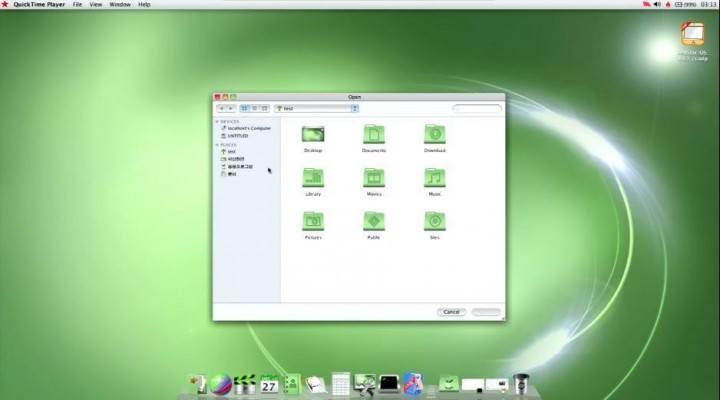
“Imagine if OS X were green. Give me that.” – Kim Jong-un (maybe).
Unsurprisingly, Red Star was built for North Korea’s intranet, so its browser (which is based on Firefox) and email client don’t even work on the real internet, because they weren’t designed for it. Also unsurprisingly, the OS contains some bits and pieces ripped directly from copyrighted software. But it also comes with some surprises, like a music composition program that lets you plop notes down onto a page and create sheet music. It even includes a built-from-scratch antivirus scanner (although it seems to scan all of your documents, and will probably mark and delete any files it can identify that the DPRK government doesn’t want you seeing).
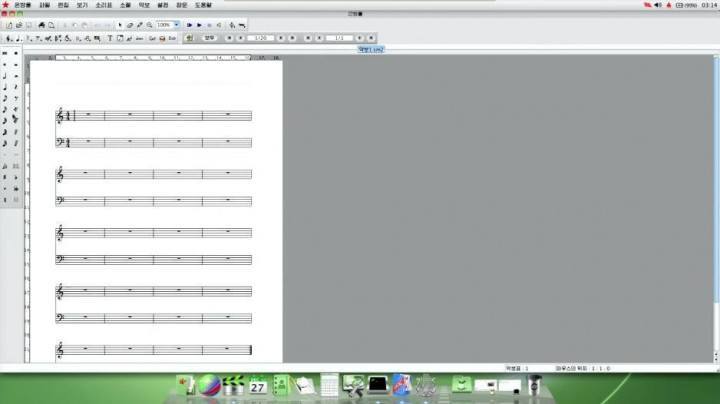
Compose your own patriotic tunes with Red Star’s music composition program.
Under the hood, one of the main focuses of Red Star is system integrity. It runs integrity checks more or less constantly on a list of files to ensure they haven’t been tampered with. If even one has been touched, the system will instantly reboot, at which point it will check for tampering, find the tampered file, and then reboot again, etc. In other words: if you mess with Red Star OS’s core files, the system basically bricks itself.
The creepiest thing about Red Star, though, is a little service called opprc, which the researchers call an “evil twin” of Red Star’s virus scanner. Unlike the virus scanner, opprc runs in the background (there’s no GUI element or other way for users to see it), and it cannot be disabled without disabling the entire OS. What it does is watermark files. When you boot your system, opprc immediately grabs your hard disk’s serial number. Then when you bring any new media or document files onto the system – by plugging in a USB stick, for example – it edits those files with an invisible watermark that includes your hard drive serial number. This is all completely invisible to the user, who will never be aware that it’s happening.
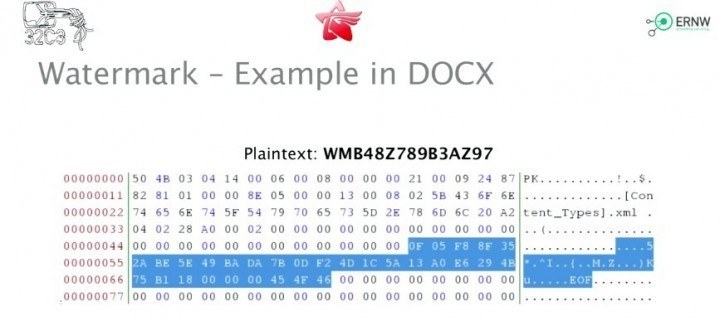
Here’s the system changing a string in a docx file to append a “WM” followed by the hard drive serial number.
The use for this, presumably, is file tracking. When the DPRK government finds a file it doesn’t like – say an image critical of the government, or a docx file written by a dissident – it can now look for the watermark and match the file to the hard drives on which the file has been loaded. So if users are passing around a jpeg via USB on Red Star machines and the authorities can get a copy, they can look at the file and see the hard drive serial number of every single user that opened it, in sequence. That, presumably, makes it easy to connect the distribution of a media file to the actual human users who’ve been passing it around, even if none of them ever connected to North Korea’s intranet.
It is ironically, as Grunow pointed out, a powerful tool for suppressing free speech that has been built on the backbone of western software developed specifically to promote freedom of information. The system likely also contains a module that sends user hard drive serials somewhere via the intranet, meaning that authorities who find a file they don’t like can probably quickly match it to an IP and then act to suppress the person or people who’ve been looking at and spreading the file.





Stay updated on the go with our mobile app.
Get latest insights with smoother, more personalized experience through TIA mobile app.