- Insights This article was written by a TIA community member. Insights pieces undergo the same rigorous editorial process that newsroom-produced articles have.
 Chloe Zou · · 5 min read
On the endless debate on OK, cancel buttons: Stick to the OS
Photo credit: Erika Wittlieb.
Whether the OK key or the Cancel key should be on the left of a dialog box is an eternal war in the button discourse among UI designers. There are always those who prefer the OK-Cancel type but others really stick to the Cancel-OK type. Each group has their own viewpoints.
In this article about CTA buttons, it was written that setting buttons is always very important. Not putting enough attention to it may risk your user conversion ratio.
What the OK-Cancel supporters think
- OK-Cancel conforms to our regular habits of speaking and reading. When we pose questions and give a positive and a negative option for an answer, we tend to express it like this: “Is this your axe, or no?” And not: “No or yes?” Moreover, in most languages, people are accustomed to read from left to right, which follows our speech habits. This is why it makes sense to put the OK button on the left side of a dialog box.
-
OK-Cancel makes it easier to see and select the OK key, given that users tend to choose OK in most situations. It also follows the browsing sequence that the picture shows below. Users who are inured to use the Tab key to jump among buttons can also save a click.
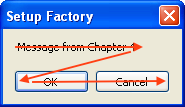
Samples of OK-Cancel
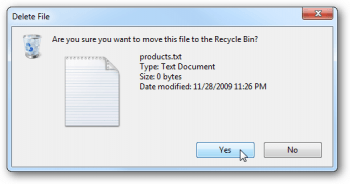
Windows.
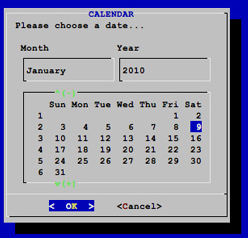
Linux.
What the Cancel-OK adherents think
My views





Stay updated on the go with our mobile app.
Get latest insights with smoother, more personalized experience through TIA mobile app.












📅 Upcoming Events
22 October 2026
Payoneer x CSPN Summit 2026