Tired of ads? Enjoy an ad-free experience by signing up.
    Willis Wee · · 2 min read

    How to: The Easy Way Out to Creating an Avatar that fits

    South-ParkThis post is created for Social Media fanatics with avatar-cropping problems.

    Now there is a solution without the use of Photoshop.

    Here we go!

    In this article, we recommend mypictr, a free-to-use website, as cropping photos has never been so easy and convenient.

    Step 1: Upload a Photo & Choose the Appropriate Network

    1

    Once a particular network is selected, you should be able to view the dimensions of your chosen avatar

    Step 2: Choose your Crop Area
    2

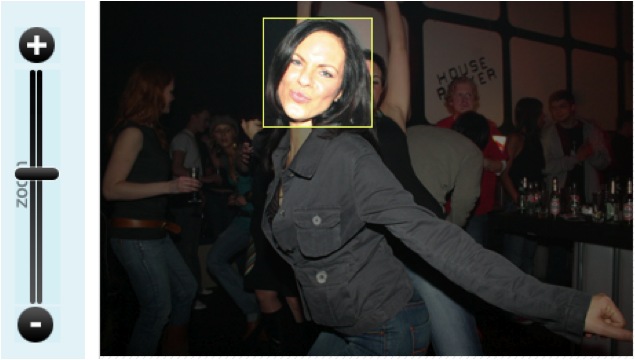
    Move the yellow box to select the area to crop. Zoom the avatar in or out to get the desired part of the image within the yellow box.

    Step 3: Collect your New Avatar

    Stay ahead in Asia’s tech landscape

    You've reached your 2 free content limit for the month. Sign up for free to read the full story.

    🏄 For casual readers / 👶 Free

    Basic

    US$0

    Free forever

    Get instant access to this article and more every month

    0 premium content

    Unlimited news briefs

    5

    5 articles

    Ad-free reading experience

    Just US$0 per day

    ⌛Sign up in 20s. No payment details needed.

    📖 For learners / 👍 Starter

    Lite

    US$4.92/month

    Billed annually at US$59/year

    Get instant access to this article and more every month

    4

    4 premium content

    Unlimited news briefs & articles

    Ad-free reading experience

    Just US$0.17 per day

    Cancel anytime

    Our subscriber community includes professionals from these companies:

    Stay updated on the go with our mobile app.

    Get latest insights with smoother, more personalized experience through TIA mobile app.
    Community Writer

    Willis Wee

    Founder at Tech in Asia. Aspires to build a company and product that people love.