 Paul Bischoff · · 6 min read
The complete English-language guide to shopping on JD’s mobile app
Taobao and Tmall might be the undisputed kings of ecommerce in China, but they are far from the only option. Earlier, we posted an English-language tutorial for foreigners who want to use Alibaba’s marketplaces using their international credit cards.
But for those of you who don’t have credit cards, prefer to shop from your phone, or just prefer to shop elsewhere, Tech in Asia has created this English guide for how to shop on JD’s mobile app.
For those of you unfamiliar with JD (formerly called 360Buy, known in Chinese as “Jingdong”), it listed on the US stock market earlier this year and is one of China’s most trusted online retailers. More importantly, the majority of the items on the JD Mall can be paid for using the cash-on-delivery option, so there’s no need to enter any bank or credit card info. The app looks great and is pretty intuitive, but can be tough to navigate without any Chinese language skills.
To get started, download the app here. Note that some of these instructions might vary slightly due to the differences between the iOS and Android apps. This tutorial was made using the Android version.
Just browsing

Let’s begin with the home screen, which has a search bar at the top and a navigation bar at the bottom. Take note of the home, cart, and user profile buttons at the bottom for later, but for now we’re just going to type in a search phrase.
As with Taobao, you’ll get the best results if you search in Chinese. I need a case for my phone, so I’ll type in “OnePlus phone case” (“一加手机套”).
When the results pop up, you can view them in either list view or tile view. Items are sorted by relevance by default, but you can also filter by price, bestselling, and user feedback. Take note of the number of people who gave feedback for each product and their positive rating percentage to get an idea of an item’s quality.
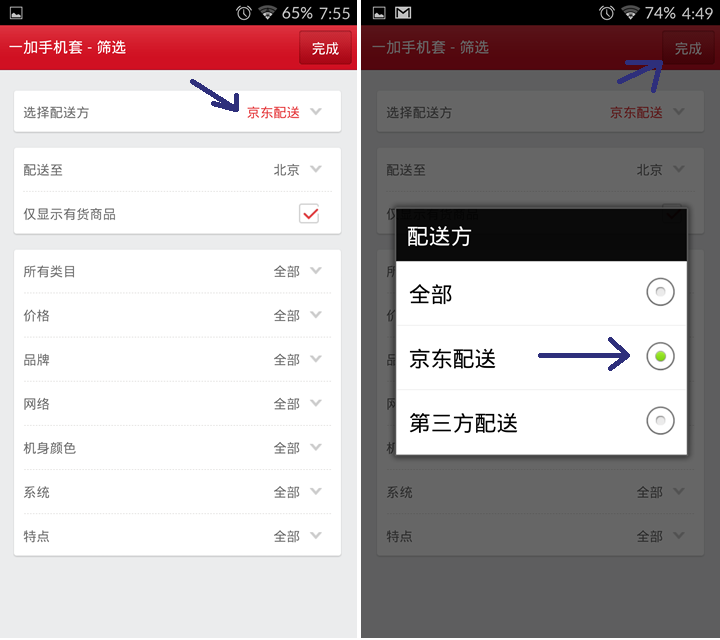
Before you start browsing, though, click the red button in the top right hand corner. This brings up a page containing all the different filters, which vary depending on your search. The filter most important to us is the top one, which will allow to you see items only sold directly through Jingdong and its official partners, and leave out third-party merchants. This ensures that all the items you see support cash-on-delivery payment. Click that bar and choose the middle option.
Registration and checkout
Post-purchase





Stay updated on the go with our mobile app.
Get latest insights with smoother, more personalized experience through TIA mobile app.










📅 Upcoming Events
30-31 March 2027
Upskill Fest