
If you’re within my Facebook friends network, you will probably notice my three-letter status update with an ingenious “via iPhone 5.”
That update caught quite a bit of attention, both on Facebook and my Adium Instant Messenger. This post will tell you how I got my via iPhone 5 status on Facebook. It’s way simple, thanks to an Indonesian developer, Alfian Khoirul Bahroin, who creatively came up with this cool app that helps you produce via iPhone 5 status update. All the better, he included the Apple logo to make it look authentic.
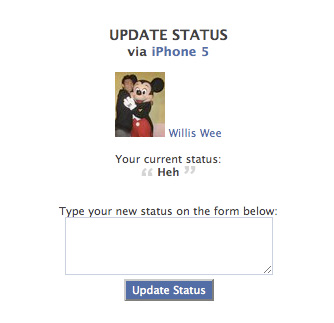
If you’re connected on Facebook, head over here and install the app here. (We’ve tried it, it’s risk free.) Once you have the app installed, it will lead you to a page where you can fill in your status update. Hit the enter button and ta-da, it’s all set.
With all the current hype surrounding the iPhone 5, now would be a great time to play a prank on your friends on Facebook. In fact, the prank is easily spotted if you click on the “via iPhone 5” link, which leads to the app page.
In any case, it’s a fun little hack that I thought I’d share.
[Source: SimonBlog]





Stay updated on the go with our mobile app.
Get latest insights with smoother, more personalized experience through TIA mobile app.












📅 Upcoming Events
22 October 2026
Payoneer x CSPN Summit 2026