Tired of ads? Enjoy an ad-free experience by signing up.
    Willis Wee · · 2 min read

    How to: The Easy Way Out to Creating an Avatar that fits

    South-ParkThis post is created for Social Media fanatics with avatar-cropping problems.

    Now there is a solution without the use of Photoshop.

    Here we go!

    In this article, we recommend mypictr, a free-to-use website, as cropping photos has never been so easy and convenient.

    Step 1: Upload a Photo & Choose the Appropriate Network

    1

    Once a particular network is selected, you should be able to view the dimensions of your chosen avatar

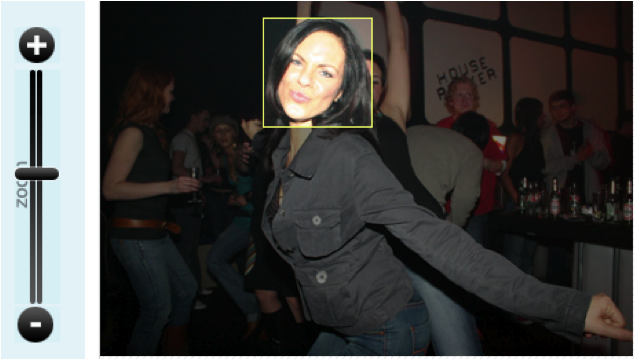
    Step 2: Choose your Crop Area
    2

    Move the yellow box to select the area to crop. Zoom the avatar in or out to get the desired part of the image within the yellow box.

    Step 3: Collect your New Avatar

    Stay ahead in Asia’s tech landscape

    You've reached your 2 free content limit for the month. Sign up for free to read the full story.

    🏄 For casual readers / 👶 Free

    Basic

    US$0

    Free forever

    Get instant access to this article and more every month

    0 premium content

    Unlimited news briefs

    5

    5 articles

    Ad-free reading experience

    Just US$0 per day

    ⌛Sign up in 20s. No payment details needed.

    📖 For learners / 👍 Starter

    Lite

    US$4.92/month

    Billed annually at US$59/year

    Get instant access to this article and more every month

    4

    4 premium content

    Unlimited news briefs & articles

    Ad-free reading experience

    Just US$0.17 per day

    Cancel anytime

    Our subscriber community includes professionals from these companies:

    Community Writer

    Willis Wee

    Founder at Tech in Asia. Aspires to build a company and product that people love.