
One key takeaway at iStrategy2010 was that it doesn’t really matter what fancy tool you have, but what matters more is knowing what you want to measure and track. Why do we have to insist on buying expensive monitoring tools when the best things in life are free?
Google makes avail many useful, free tools that are useful for small businesses in tracking their performance, as shared by Aliza Knox.
Google Search
Most of us just use the search bar for basic searches, but did you know the search tool has got many other functionalities many do not know of?
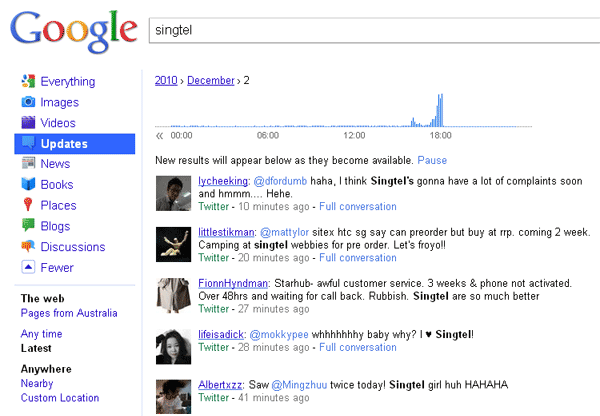
- Updates: If you click “More” on the left menu bar, you would discover that there are more ways to filter your search results. Updates gives you tweets from Twitter, Discussions from blogs, News from timely sources, etc. Not forgetting there is a timeline on the top to show you which time of the day was most happening.
- Wonder Wheel: Click on “More Search Tools” on the left to get to Wonder Wheel. It shows related search terms to the current searched query and thus enabling you to explore relevant search terms which might be the ones you originally wanted to search for, or simply give you more options to gain more information.
- Timeline: Click on “More Search Tools” on the left, Custom Range allows you to filter results by a particular period. It seems like the quote “You can run but you cannot hide” is true.
Google Alerts
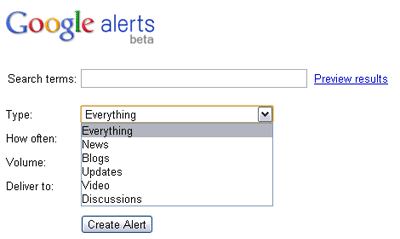
The content monitoring service allows you to stay ahead of the competition and monitor what people are talking about your brand via e-mail alert or feed. You can choose how frequent you want to receive these notifications and the type of alerts you would like to get: news, blogs, updates, discussions, videos, etc.
Google Insights
There are different ways Insight helps marketers plan their campaigns better. Basically, type in a few keywords and it will display the number of searches conducted worldwide. You can compare the queries by search terms, locations, or even time periods. One example is deciding which messages will resonate with their audience, and what keywords
In this example, I have inserted several keywords I want to compare. We can tell that the number of queries for laptop is consistent but dipped slightly later in the year, and it is possible the introduction of tablets caused this.
You may even track what countries are mostly searching for the keyword. This is useful when localising the content to find out what type of keywords appeal to the different regions. The only downside is, the number may be skewed depending on the population and size of the country, and is only valid mostly in English, but Google is definitely working on it.





Stay updated on the go with our mobile app.
Get latest insights with smoother, more personalized experience through TIA mobile app.












📅 Upcoming Events
22 October 2026
Payoneer x CSPN Summit 2026