Paul Bischoff · · 3 min read
How to make your favorite animated GIFs into custom stickers on WeChat
WeChat can do many things, but one of my favorite aspects of China’s most popular messaging app is its support for GIF animations as stickers. Lots of chat apps have stickers these days, and Line even added a feature where users can create and sell their own, but these are mostly relegated to cutesy, G-rated material.
WeChat lets any user create and share custom stickers from the wild and wacky GIF memes we’ve all come to know and love on the internet. I’ve amassed a library of animated GIFs ranging from the weird to the trippy to the vulgar. Showing off your collection is often a conversation piece among the young expat crowd here in Beijing, where the western GIF meme trend has been imported onto to China’s local chat medium.
WeChat allows upward of 100 or so custom stickers to be stored. Most of these spread virally through friend groups, but if you really want to stand out from the crowd, you’ll have to make your own. Here’s how to make your favorite GIFs from the web into custom stickers on WeChat.
1. Find a GIF
 Short and sweet is the rule here. WeChat has pretty limited size requirements, which we’ll get into later, so you probably want the full animation to last no more than three seconds. Remember to pick something that will look good when it’s the size of your fingernail. I went with this one from Game of Thrones.
2. Resize it
Most GIFs are too big for WeChat by default. A Google search returns a ton of web-based GIF resizers that you can use for free. I recommend this one, as some other ones I tried got messed up during step four. Finding the right pixel-to-file size ratio can be tricky, but you’ll want to stay below 250KB. WeChat will allow for a bit more, but you’ll start getting weird white artifacts at the bottom. If it’s a short GIF like this and you have some leeway, between 150 and 200 pixels tall is ideal.
3. Get it on your phone
If you’ve done steps one and two on a desktop like I have, you’ll need to get the image onto your phone. Pretty self-explanatory – just make sure it ends up in a folder that can be accessed via your phone’s default image gallery app.
4. Add it to WeChat
In WeChat’s “Discover” tab, head to the Sticker Shop. From there, click on the settings cog, and near the bottom you’ll see the “Custom” option.
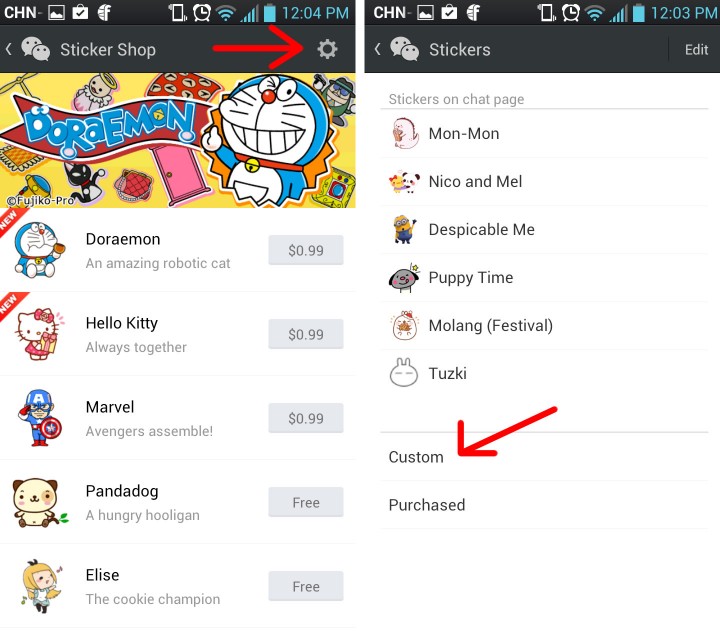
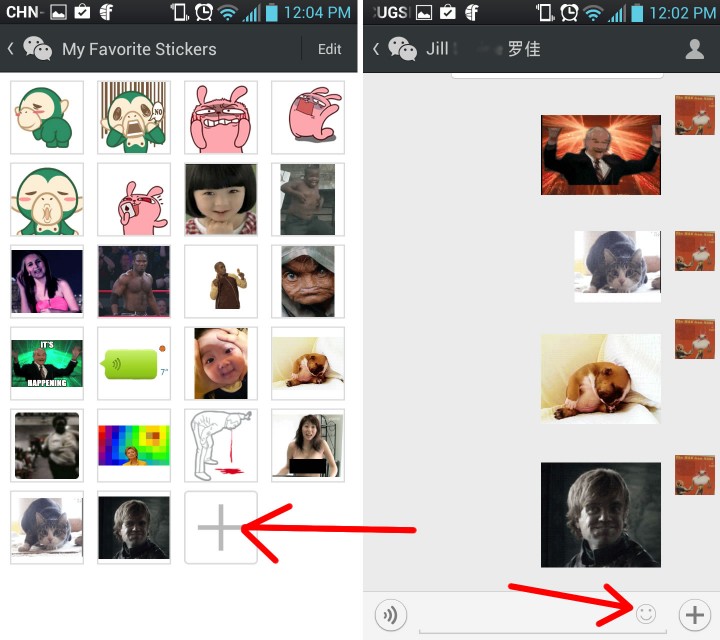
This reveals all the custom stickers you’ve added so far. Click on the plus (+) sign at the end and navigate to your desired GIF. Confirm, then restart WeChat. Voila! You’ve now got a custom animated GIF sticker.





Stay updated on the go with our mobile app.
Get latest insights with smoother, more personalized experience through TIA mobile app.