Malavika Velayanikal · · 3 min read
This beauty app lets you try out as many exotic makeup kits as you fancy before you buy one
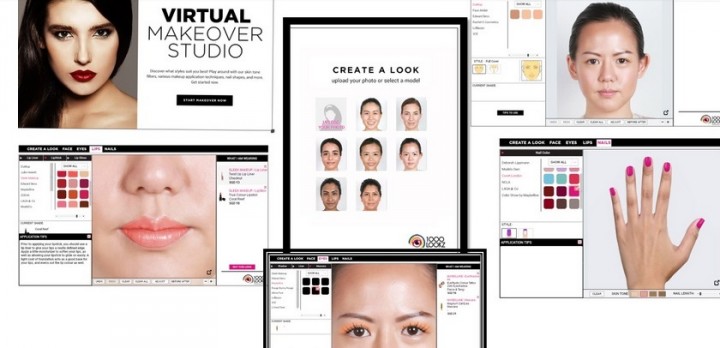
A few weeks ago, beauty ecommerce site Luxola lifted the veil over its new app, LX Studio. This nifty application allows you to virtually try out beauty products from different brands before you decide what makeup to buy. You can toy with foundation, blushers, lipsticks, nail colors, and even dabble in multiple eye-lining techniques. What was once possible only after hours of being a lab rat with a stylist at a brick and mortar store can now be done in mere seconds and, more importantly, for free.
Alexis Horowitz-Burdick started Luxola in Singapore three years ago. The startup built traction over the years, and now sells over 150 international brands of cosmetics. A frequent feedback she heard from customers was that they would like to try new products, compare colors, and check whether it suits them or not before deciding what to buy. That got her thinking.
Offline sampling is a tried-and-tested model in the fast-moving consumer goods (FMCG) segment, especially so for beauty products. There are several hot startups doing that – like BirchBox, GlossyBox, Ipsy, BeautyArmy, and so on. They deliver samples of makeup, nail colors, fragrance, and skin-care products to your home for a fee of US$10 to US$15 a month. The products in the kit are worth several times that much, and so the customers get an affordable trial, along with an element of surprise, before they make up their minds.
Horowitz-Burdick wanted to better that. She tells Tech in Asia:
We sensed a gap in the Luxola experience and I felt a virtual makeover studio that allowed shoppers to realistically see what products would look like on them would be the best way to enhance our online shopping experience.
Getting the makeover
Here’s how the virtual makeover works: You start by uploading your photo into the app. You have the option to pick one of Luxola’s pre-loaded photos, but it’s more fun to try tricks with your own.
The app will ask you to trace your eyes and lips. This takes some patience. I had to try a few times to get the brush lines close enough to the real lines, and it was still far from perfect. Maybe a video tutorial on how to use the tool could help there. The real fun starts when you start applying the makeup. I picked Face Atelier’s Ultra foundation, Sepia, after trying one of Edward Bess, Lollipops, and 3CE. Then I chose Sleek MakeUP powder, its chestnut colored Twist Up lip liner, and Gloss Me in Kiss&Tell lip gloss.
The before/after button gave me a hearty laugh as I had done myself up all wrong.
Unlike me, if you are satisfied with the virtual makeover, the app will let you move to the billing counter with a ‘buy this look’ button.
It’s fun but…
Yes, the app is fun, but it’s also a wee bit glitchy. For instance, this tool won’t tell you the texture of the product. For foundations, lipsticks, and gloss, that’s important. That’s why most people try the testers at offline stores. Lighting is also important. There’re just too many factors to get an accurate portrayal of what the makeup will actually look like on someone. Another issue with this kind of app is that phone cameras and displays vary in their color output. This is especially tough for products like foundation, where the color differences are subtle but important.
So, if you are keen to try a specific product you found on Luxola, you can write to them, and they promise to send you a sample if it’s available. If you’re buying, the startup does next-day hand deliveries in Singapore, and ships to Indonesia, Thailand, the Philippines, Hong Kong, Brunei, Malaysia, Australia, and the United Arab Emirates.
Want to see what that exotic makeup kit could do for you? Now it’s as easy as playing a game online with free virtual makeover apps like Lx Studio, Modiface, and Mary Kay’s Makeover. And you don’t even have to scrub your face after each trial.





Stay updated on the go with our mobile app.
Get latest insights with smoother, more personalized experience through TIA mobile app.